CNC vs PLC: what they control, how they are programmed and when to use them
Sielco Sistemi —
On a shop floor it is common to find a CNC and a PLC working side by side, yet the two controllers solve very different problems. A CNC (Computer Numerical Control) drives the precise, coordinated motion of machine axes, while a PLC (Programmable Logic Controller) manages the discrete logic, sequencing and safety of the surrounding equipment. Understanding CNC and PLC roles clearly is the first step to designing a reliable machine or line, and to knowing when to bring in a supervisory layer such as Winlog Evo on top of both.
What is a CNC and what does it control
A CNC, built on the principles of numerical control, translates a part program (G-code) into coordinated movements of servo axes, spindles and tool changers on machine tools such as lathes, mills and routers. Its job is motion: interpolating trajectories, controlling feed rate and spindle speed, and managing tool offsets with the precision required for machining. CNC controls from vendors such as Fanuc or Siemens’ Sinumerik line are purpose-built for this kind of high-speed, high-precision motion control, which is fundamentally different from general-purpose logic processing.
Because CNC firmware is optimized for closed-loop servo control, it typically runs its own real-time kernel separate from general automation logic, with feedback from encoders and glass scales measured in microns. This is why CNC controllers are rarely used to manage conveyors, safety curtains or plant-wide sequencing: their architecture is tuned for continuous path accuracy, not for scanning hundreds of discrete I/O points every few milliseconds.
What is a PLC and what does it control
A PLC is designed for discrete and sequential control: reading digital and analog inputs from sensors, executing ladder logic or structured text, and driving outputs such as relays, valves and motor starters. PLCs from manufacturers like Siemens and Rockwell Automation (Allen-Bradley) are the backbone of conveyors, packaging lines and safety interlocks. Because PLCs expose their data over standard protocols, a SCADA platform such as Winlog Evo can connect to them through a wide range of communication drivers to centralize supervision.
A modern PLC also handles the safety layer of a machine or line: emergency stops, light curtains, interlocked guards and motor overload protection are typically wired into safety-rated PLC modules or dedicated safety controllers. This deterministic, rule-based behavior is what makes PLCs the right choice whenever the priority is repeatable sequencing rather than continuous path motion.
CNC vs PLC: key differences (axes, motion, logic, programming languages)
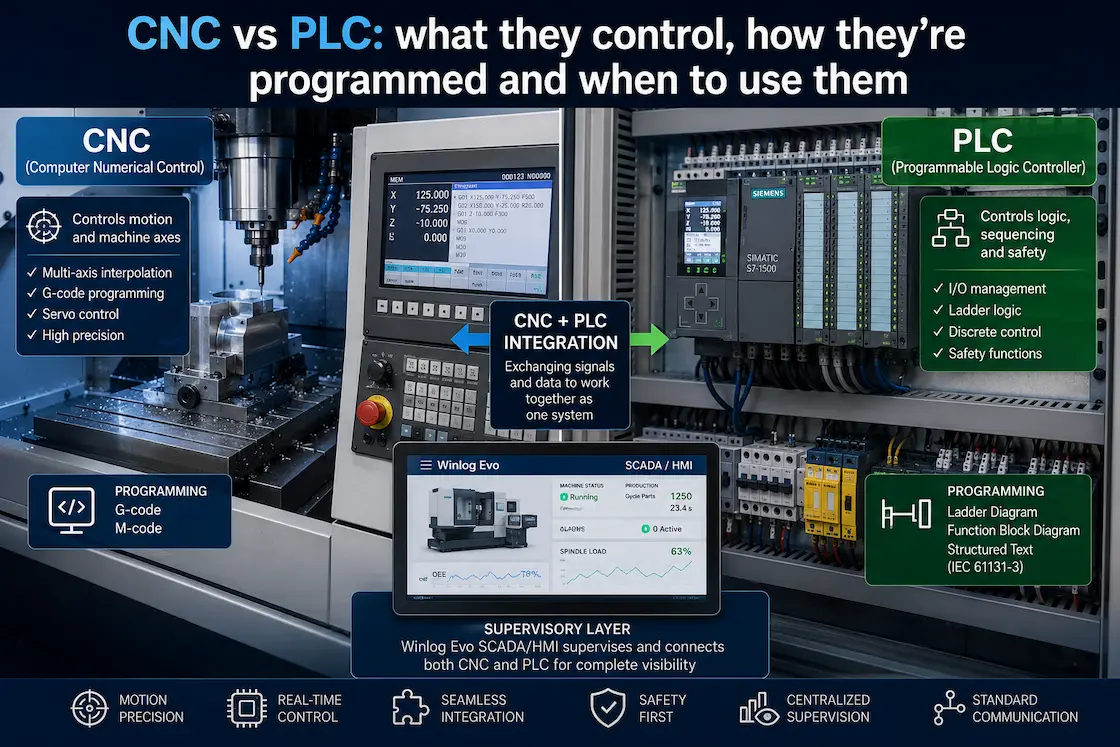
The clearest way to answer “what is the difference between CNC and PLC?” is to compare what each one optimizes for. A CNC is built around multi-axis interpolation, cutting-edge trajectory planning and G-code, and it typically closes fast servo loops in real time. A PLC is built around scan-cycle logic, I/O handling and ladder diagrams or IEC 61131-3 languages, prioritizing deterministic, safety-rated sequencing over motion precision. In short, the difference between CNC and PLC is motion versus logic: one shapes the part, the other orchestrates the process around it.
Programming languages reflect this split as well. CNC part programs are written mostly in G-code and M-code, focused on geometry, tool paths and cutting parameters. PLC programs, by contrast, are usually written in ladder diagram, function block diagram or structured text as defined by IEC 61131-3, focused on Boolean logic, timers, counters and state machines. A technician fluent in one language set cannot automatically read the other, which is why machine builders usually keep separate CNC programmers and PLC programmers on staff, or rely on integrators who master both disciplines.
CNC + PLC integration in a line/machine
In most real machines, the CNC and the PLC are not competitors but partners. The PLC typically manages the machine’s auxiliary functions — guards, coolant, pallet changers, part clamping — and exchanges handshake signals with the CNC to start or interrupt a machining cycle. Layering a SCADA system on top of this pair, using Winlog Evo, lets operators visualize CNC program status, PLC alarms and cycle counters in one dashboard, and log this data historically for OEE and maintenance analysis.
When to choose CNC vs PLC
The choice is rarely either/or: you need a CNC whenever a process requires coordinated, continuously interpolated axis motion — milling, turning, grinding, cutting — and a PLC whenever the process is dominated by discrete logic, timing and sequencing. Many machine builders combine both under a single supervisory HMI/SCADA layer so operators do not need to interact with two separate control philosophies. As a rule of thumb, if the question is “what shape does this need to become?” you are in CNC territory; if the question is “what should happen next, and only if it is safe?” you are in PLC territory.
Common mistakes and FAQs
The most frequent mistake is trying to force one controller to do the other’s job — for example, implementing complex motion interpolation inside PLC logic instead of a proper CNC, or vice versa. Another common issue is treating CNC and PLC as isolated islands instead of integrating their data into a shared supervisory system, which makes troubleshooting and traceability far harder than it needs to be. Standardizing on well-documented drivers and a platform like Winlog Evo avoids both problems.
Want to see CNC and PLC data unified in a single supervisory view? Try the Winlog Evo web demo, check the supported communication drivers, or contact Sielco Sistemi for a tailored assessment.
FAQ
- What is the difference between CNC and PLC?
- A CNC controls coordinated, continuously interpolated axis motion on machine tools using G-code, while a PLC controls discrete logic, sequencing and safety using ladder diagrams or IEC 61131-3 languages. In short, a CNC shapes the part and a PLC orchestrates the process around it.
- Can a PLC replace a CNC, or vice versa?
- Not effectively. A PLC lacks the real-time servo interpolation needed for precise multi-axis machining, and a CNC is not designed for general-purpose discrete logic, timing and safety sequencing across a whole line. Each is purpose-built for its own task, which is why they are normally used together rather than as substitutes.’,
- How do CNC and PLC communicate on the same machine?
- Most CNC and PLC pairs exchange handshake signals: the PLC tells the CNC when auxiliary functions (guards, clamping, coolant) are ready, and the CNC reports program status and cycle completion back to the PLC. A SCADA layer such as Winlog Evo can then read both sides through dedicated communication drivers to give a unified view.
- What programming languages are used for CNC vs PLC?
- CNC part programs are written mainly in G-code and M-code, focused on tool paths and cutting parameters. PLC programs are usually written in ladder diagram, function block diagram or structured text as defined by IEC 61131-3, focused on Boolean logic, timers and counters.
- Evo fit into a CNC and PLC environment?
- Winlog Evo sits above CNC and PLC controllers as a supervisory layer, connecting to both through communication drivers to display program status, alarms and cycle counters in one dashboard, and to log this data historically for OEE and maintenance analysis.