SCADA vs HMI: supervision vs operator interface and how to choose
Sielco Sistemi —
An HMI and a SCADA system are often mentioned in the same breath, and many people use the terms loosely, but SCADA vs HMI differences matter once a plant grows beyond a single machine. This guide explains what each one does, when one is enough, and how a platform such as Winlog Evo covers both roles as a project scales.
What is an HMI and what does it do
An HMI, or operator panel, is a local screen mounted on or near a machine that shows its current status and lets an operator start, stop and adjust it directly. HMIs are typically single-station: one screen, one machine or one skid, with little or no built-in historization, multi-user management, or connectivity to other stations. They are the most direct, immediate way for a person to interact with a piece of equipment, which is exactly what they are designed for.
Because HMIs are usually sold as part of the machine itself, they tend to be inexpensive and quick to commission, which is exactly why OEMs default to them for standalone equipment. The trade-off is that scaling an HMI-only approach across many machines means as many disconnected islands of data as there are screens.
SCADA vs HMI: differences (data, history, alarms, multi-user)
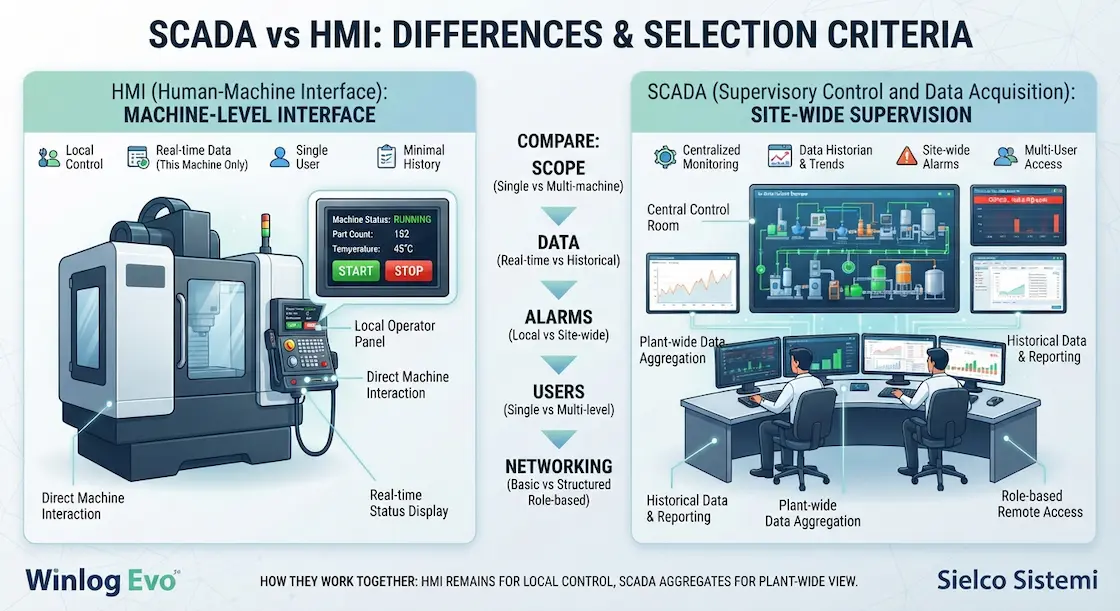
The core of the SCADA vs HMI comparison comes down to scope. An HMI shows live data for its own machine; SCADA aggregates live and historical data from many machines, PLCs or entire sites into one supervisory view. An HMI usually has minimal or no historical logging; SCADA is built around long-term historization, trending and reporting. Alarm handling differs too: an HMI can show a local fault, but SCADA centralizes alarm priorities, acknowledgement workflows and escalation across every connected asset. Finally, an HMI is generally single-user by design, while SCADA supports multiple simultaneous users with different permission levels, from operators to managers to remote maintenance staff.
Networking capability is another dividing line: most HMIs can be viewed remotely only through basic remote-desktop-style tools with no access control beyond a password, while SCADA is built for structured, role-based remote access across a corporate network or the internet, with a full audit trail of who connected and when.
When to choose HMI vs SCADA (typical cases)
When HMI is enough: a single standalone machine, a simple skid, or any application where local control and status is all that is needed, with no requirement to log history, generate reports, or connect to other equipment. When you need SCADA: as soon as there is more than one machine or PLC to supervise together, when operators need historical trends or alarm history, when management needs KPI reports, or when the plant spans multiple areas or sites that benefit from centralized visibility. Many projects start with HMIs on individual machines and add SCADA once the number of machines and the need for coordinated data makes that step worthwhile.
A practical rule of thumb: if you find yourself walking between multiple HMI screens to understand what is happening across a shift, or exporting numbers by hand from several panels into a spreadsheet, that manual effort is a strong sign SCADA would pay for itself quickly.
How they work together (HMI within a SCADA architecture)
In a mature SCADA architecture, HMIs and SCADA are not competitors: local HMIs remain in place for direct machine control, while a SCADA platform like Winlog Evo connects to the PLCs behind them to aggregate data, alarms and history into a plant-wide view. This layered approach lets operators keep the fast, familiar local interface they already know, while managers and remote staff get the broader visibility SCADA provides, without duplicating control logic or forcing every station onto a single unified screen.
In practice, this means the local HMI continues to handle the split-second interactions an operator needs at the machine, while SCADA handles everything that benefits from a wider view: cross-machine KPIs, plant-wide alarm history, and reports that pull data from every connected station into one consistent record.
Not sure whether your project needs an HMI, SCADA, or both? Try the Winlog Evo web demo, check the supported communication drivers, or contact Sielco Sistemi for guidance.
FAQ
- What is the main difference between SCADA and an HMI?
- An HMI shows live data for a single machine with little or no history, while SCADA aggregates live and historical data from many machines or sites into one supervisory view with centralized alarms and multi-user access.
- When is an HMI enough without needing SCADA?
- An HMI is enough for a single standalone machine or simple skid where local control and status is all that is needed, with no requirement to log history, generate reports, or connect to other equipment.
- Can HMIs and SCADA be used together on the same plant?
- Yes, this is the most common architecture: local HMIs remain for direct machine control, while a SCADA platform connects to the PLCs behind them to aggregate data, alarms and history into a plant-wide view.
- What signals that a plant has outgrown standalone HMIs?
- If operators need to walk between multiple HMI screens to understand what is happening across a shift, or export numbers by hand from several panels into a spreadsheet, that manual effort is a strong sign SCADA would pay for itself quickly.
- Does adding SCADA mean replacing existing HMIs?
- No. In a layered architecture, local HMIs stay in place for direct machine control while SCADA connects to the PLCs behind them, so operators keep the familiar local interface while gaining plant-wide visibility.