SCADA vs PLC: real-time control vs supervision and data acquisition
Sielco Sistemi —
PLC vs SCADA differences come up constantly in plant conversations because the two are almost always deployed together, yet solve very different problems: one controls, the other supervises. This guide explains what each does, how PLC SCADA integration works in practice, and when it is time to add a platform such as Winlog Evo on top of an existing PLC installation.
What is a PLC and what does it control
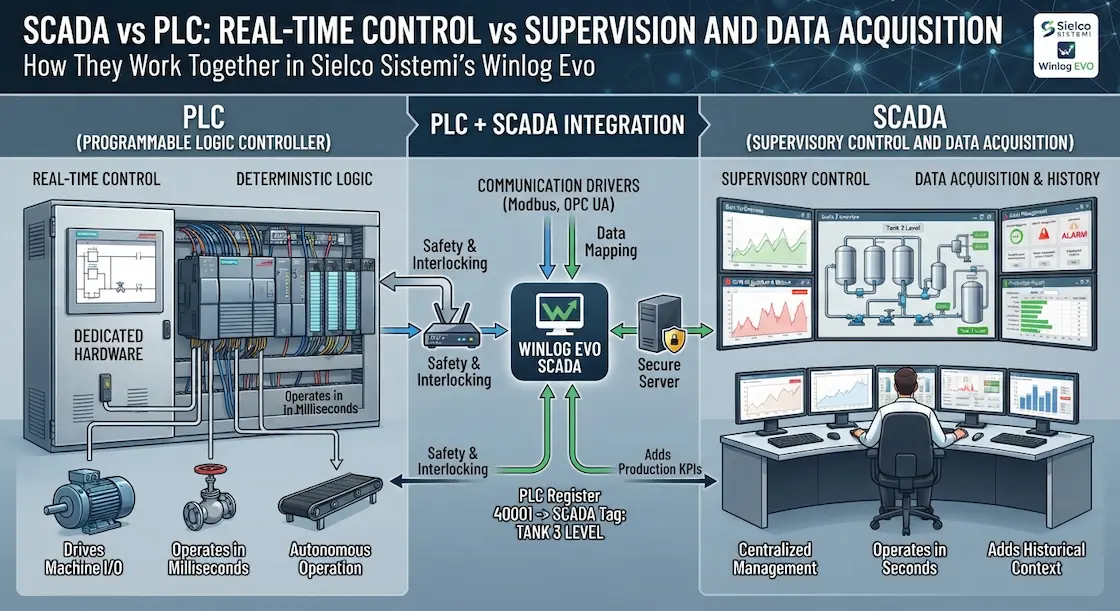
A PLC is a ruggedized industrial computer that executes real-time logic close to the machine or process it controls: reading sensor inputs, running ladder logic or structured text, and driving outputs such as motors, valves and relays. PLCs from manufacturers like Siemens and Rockwell Automation are deterministic by design, scanning their program on a fixed cycle so that safety-critical logic executes predictably every time, regardless of what else is happening on the network.
Because a PLC’s scan cycle is self-contained, it keeps controlling its machine correctly even if it is completely disconnected from any supervisory system, which is exactly the safety property that makes it suitable for controlling physical equipment in the first place.
PLC vs SCADA: roles and responsibilities
The core of SCADA vs PLC comes down to scope and timescale. A PLC’s job is control: it decides, in milliseconds, what a motor, valve or actuator should do right now, and it keeps working even if every other system on the network goes offline. SCADA’s job is supervision: it reads data from one or many PLCs, displays it to operators, stores it historically, manages alarms, and lets authorized users send commands back — but it operates on a supervisory timescale of seconds, not milliseconds, and its unavailability should never stop the underlying process from running safely. In short, PLCs own control; SCADA owns visibility, history and coordination across control systems.
This separation of concerns is deliberate and should be preserved in any design: safety and interlocking logic belongs in the PLC, never solely in SCADA, since SCADA runs on general-purpose computing infrastructure that is inherently less deterministic and less available than dedicated control hardware.
PLC + SCADA architecture (tag drivers, network)
In a typical PLC+SCADA architecture, the SCADA platform connects to each PLC through a communication driver matched to that PLC’s native protocol or a common standard like Modbus or OPC UA. Each PLC register or memory address is mapped to a SCADA tag with a meaningful name, engineering units and alarm limits, so operators see "Tank 3 Level" instead of a raw register number. Winlog Evo’s library of PLC drivers covers the major automation vendors, which is what makes it possible to supervise a mixed-vendor plant from a single SCADA project without custom development on the PLC side.
Network design also matters: best practice keeps the PLC control network separate from general office traffic, with the SCADA server acting as the single, controlled bridge between the two, rather than connecting every PLC directly to a flat corporate network.
When to add SCADA and best practices (reliability, security, maintenance)
When to add SCADA to a PLC-only system: as soon as more than one PLC needs to be supervised together, as soon as operators need historical trends or centralized alarms, or as soon as management wants production KPIs without walking the floor. For reliability, design the SCADA layer so that a SCADA outage never interrupts PLC control — supervision should be additive, not load-bearing. For security, apply role-based access, encrypted remote connections and network segmentation between the PLC network and the wider corporate network, following recommendations such as those published by CISA. For maintenance, keep tag naming and driver documentation up to date so that plant supervision stays maintainable as PLCs are added, replaced or reprogrammed over the life of the plant.
A final practical point: when adding SCADA to an existing PLC fleet, start with read-only tags before enabling write-back commands, so operators and engineers can validate the tag mapping against real plant behavior before SCADA is allowed to change anything on the floor.
Ready to connect your PLCs to a SCADA layer? Try the Winlog Evo web demo, check the supported PLC drivers, or contact Sielco Sistemi for guidance.
FAQ
- What is the fundamental difference between a PLC and SCADA?
- A PLC controls: it decides in milliseconds what equipment should do right now and keeps working even if disconnected from everything else. SCADA supervises: it aggregates data, alarms and history from one or many PLCs for operators and management.
- How does a SCADA system connect to a PLC?
- Through a communication driver matched to the PLC’s native protocol or a common standard like Modbus or OPC UA. Each PLC register is then mapped to a SCADA tag with a meaningful name, engineering units and alarm limits.
- When should SCADA be added to a PLC-only system?
- As soon as more than one PLC needs to be supervised together, when operators need historical trends or centralized alarms, or when management wants production KPIs without walking the floor.
- Should safety logic ever be moved from the PLC to SCADA?
- No. Safety and interlocking logic belongs in the PLC, never solely in SCADA, since SCADA runs on general-purpose computing infrastructure that is inherently less deterministic and less available than dedicated control hardware.
- What is a safe way to start integrating SCADA with an existing PLC fleet?
- Start with read-only tags before enabling write-back commands, so operators and engineers can validate the tag mapping against real plant behavior before SCADA is allowed to change anything on the floor.