SCADA reporting and SQL integration: data structure, automation and traceability
Sielco Sistemi —
Data that stays locked inside a SCADA system is only half useful; the other half of the value comes from turning it into SCADA reports that management can read and structured records that other systems can query. This guide covers how reporting and SQL integration work together to deliver both, using Winlog Evo as a practical reference.
SCADA report types (production, quality, energy, maintenance)
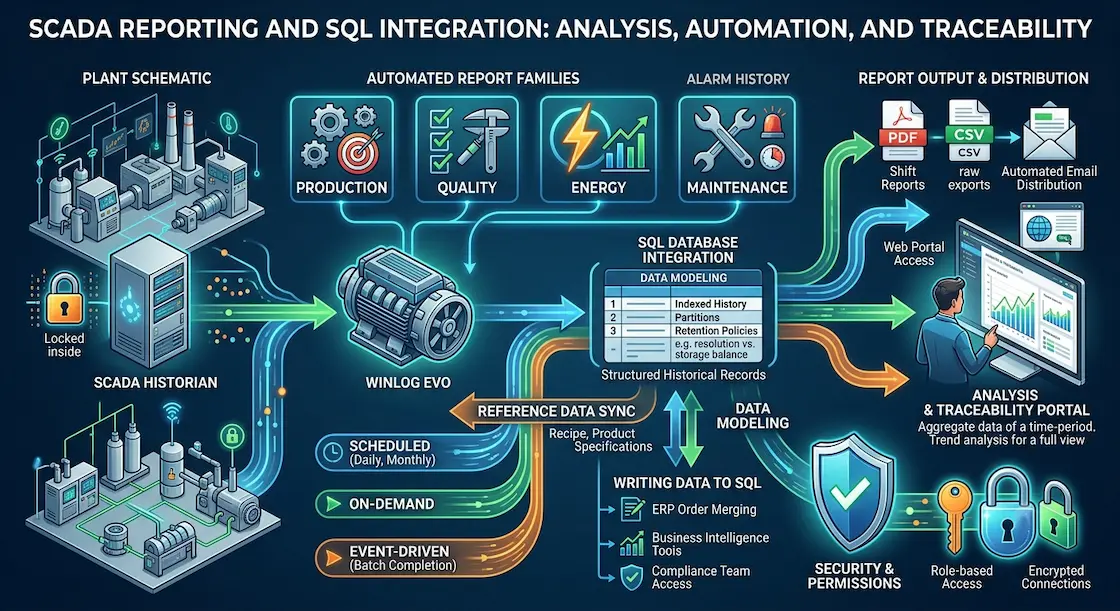
Most plants need four recurring report families: production reports (output, cycle counts, downtime causes), quality reports (defect rates, out-of-tolerance events), energy reports (consumption by line or shift), and maintenance reports (alarm frequency, runtime hours per asset). Structuring reports around these categories from the start makes it much easier to compare data across time periods and to hand off clean numbers to management without manual rework.
It also helps to design each report family with a specific audience in mind: production and quality reports usually serve shift supervisors and continuous-improvement teams, energy reports serve facility and sustainability managers, and maintenance reports serve the reliability engineering team, each with different levels of technical detail expected.
Scheduled, on-demand and event-driven reports
A mature SCADA platform supports three reporting triggers: scheduled reports that run automatically at fixed times (daily shift summaries, monthly energy reports), on-demand reports that an operator or manager generates for a specific date range, and event-driven reports triggered by a specific condition, such as a batch completion or a threshold breach. Covering all three removes the need for manual spreadsheet work and ensures reports are generated consistently even if nobody remembers to run them.
Event-driven reports are particularly valuable in batch and recipe-based processes, where a single automatically generated document tied to a specific production order gives quality and traceability teams everything they need without having to reconstruct the timeline from raw historian data after the fact.
Output and distribution (PDF, CSV, portals, email)
Report output should match how the recipient actually consumes it: a PDF is right for a formatted shift report emailed to a manager, while a CSV export is right for raw data destined for a spreadsheet or another analysis tool. Automated email distribution and web portal access cover the two most common delivery needs: push reports to people who need a summary, and let people who need to dig deeper pull data on demand.
Writing data to SQL: use cases
Writing data to SQL is what turns a SCADA historian from a closed archive into an open resource. Typical use cases include merging SCADA production data with ERP order data for true cost-per-unit analysis, feeding a business intelligence tool directly from the SCADA database instead of exporting files, and giving quality or compliance teams standard SQL access to historical values without needing SCADA-specific software. Because Winlog Evo can write and read directly from SQL databases, these integrations do not require custom middleware.
This also opens the door to two-way integration: not only can external systems read SCADA history, but a SCADA project can read reference data back from SQL as well, for example pulling recipe parameters or product specifications set by an ERP system before a production run starts.
Data modelling and performance (history, indexes, retention)
As SCADA data history grows into millions of rows, database design decisions start to matter: indexing the timestamp and tag-name columns keeps queries fast, partitioning older data by month or year keeps tables manageable, and a clear retention policy (for example, full resolution for 90 days, hourly averages beyond that) balances storage cost against the level of detail actually needed for long-term analysis and traceability.
Security and data permissions
Reporting and SQL access widen the attack surface of a SCADA system, so data permissions need the same discipline as the rest of the platform: read-only database accounts for reporting tools, role-based access so operators cannot alter historical records, and encrypted connections between the SCADA server and any external system reading its data. Getting this right is what makes SQL-based reporting safe enough for regulated environments that need full traceability without compromising the integrity of production data.
Want to see SCADA reporting and SQL integration configured in practice? Try the Winlog Evo web demo, review the supported communication drivers, or contact Sielco Sistemi for guidance.
FAQ
- What types of reports can SCADA software generate?
- Most plants need four recurring report families: production reports, quality reports, energy reports, and maintenance reports, each serving a different audience with different technical detail.
- What is the difference between scheduled and event-driven reports?
- Scheduled reports run automatically at fixed times, such as daily shift summaries. Event-driven reports are triggered by a specific condition, such as a batch completion or a threshold breach, and are especially valuable in batch and recipe-based processes.
- Why write SCADA data directly to a SQL database?
- Writing to SQL turns the SCADA historian from a closed archive into an open resource, allowing production data to be merged with ERP data, feeding business intelligence tools directly, and giving other teams standard database access without SCADA-specific software.
- How should SCADA historical data be managed as it grows?
- Index the timestamp and tag-name columns to keep queries fast, partition older data by month or year to keep tables manageable, and apply a clear retention policy that balances storage cost against the detail needed for analysis and traceability.
- How do you keep SQL-based SCADA reporting secure?
- Use read-only database accounts for reporting tools, role-based access so operators cannot alter historical records, and encrypted connections between the SCADA server and any external system reading its data.